


|
Name |
LumaFusion |
|---|---|
|
Google Play Link |
GET IT ON
Google Play
|
|
Category |
Video Players & Editors |
|
Developer |
LumaTouch |
| Last version | 2.6.1 |
|
Updated |
|
|
Compatible with |
Android 10+ |
Introduction to LumaFusion
LumaFusion is a mobile editing powerhouse designed for creators who want studio-level tools right at their fingertips. Built for touchscreen workflows, this app caters to anyone from mobile journalists and YouTubers to indie filmmakers and content-obsessed Gen Z creatives who crave smooth, intuitive video editing without hauling around a laptop. It doesn’t try to be flashy it just works, and it works really well.
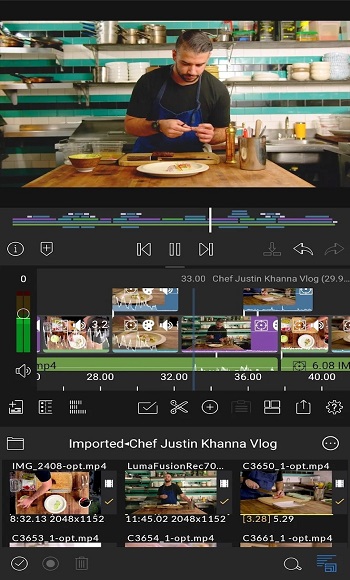
With support for up to six video and six audio tracks, LumaFusion turns your phone or tablet into a portable editing studio. Whether you're trimming a quick reel or layering a full-on short film, it gives you space to build out your scenes, sync your sound, and tweak transitions like a pro. The timeline is magnetic, responsive, and lets you slide clips around like puzzle pieces zero fuss, just flow.
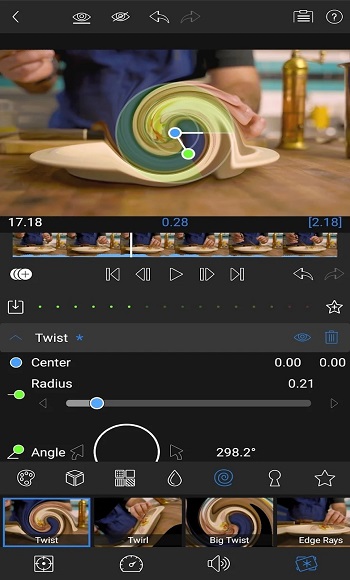
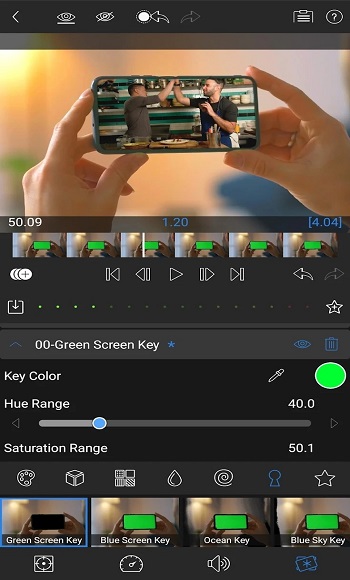
It doesn’t stop at the timeline, though. LumaFusion goes deep with color correction tools that actually feel satisfying to use. We’re talking waveform scopes, LUTs support, and keyframe control that lets you animate effects without needing a degree in motion design. Oh, and yes, green screen and chroma keying are baked in too. Want to fake a Tokyo skyline behind your cat? You totally can.
Audio-wise, it doesn’t mess around. You get graphic EQs, dual-mono support for interviews, and even automatic ducking to keep your voiceover crisp while the background music chills. It’s that type of pro feature that usually costs a subscription but here, it’s part of the baseline experience. Plus, the app lets you record voiceovers straight into your timeline, so podcast-style edits or narration projects are a breeze.
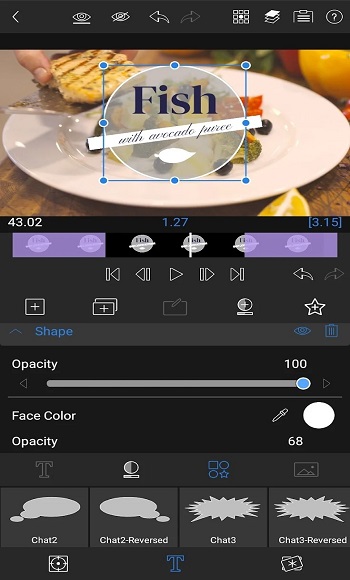
Design freaks, you're covered too. LumaFusion’s title tools let you mash up text, shapes, images, and fonts in custom layers. There’s full control over shadows, borders, and imported fonts, and if you find a style you love, save it as a preset. Team editing or just obsessive consistency? Easy.
When it comes to sharing your edits, LumaFusion’s export settings let you tweak resolution, bitrate, and frame rate without overcomplicating things. Uploading straight to cloud storage or social media? Yep. Need different aspect ratios for TikTok, YouTube, and a cinema screen? Sorted. The app supports everything from 18fps to 240fps, so whether you’re doing a slo-mo dance or a slick montage, it has your back.
And for those who want to level up, there's a one-time Speed Ramping upgrade no surprise subscriptions unless you want full Storyblocks access too. The Creator Pass bundles everything into a monthly plan with effects, royalty-free content, and advanced motion tools. But even without that, the free version already punches way above its weight. It’s the kind of app you open once and never want to stop using.
FAQs LumaFusion
What is LumaFusion?
+
LumaFusion is a mobile video editing app designed for creators who need advanced tools like keyframes, chroma key, and multitrack timelines on the go.
Does LumaFusion work for beginners or only professionals?
+
It’s built for all skill levels — the interface is beginner-friendly, but there’s enough depth to satisfy pro editors with complex projects.
Can you add voiceovers and background music in LumaFusion?
+
Yes, you can record voiceovers directly into the timeline and fine-tune background music using audio ducking, EQs, and keyframes.
Is LumaFusion available for Android?
+
Yes, LumaFusion is officially available for Android and supports editing directly from media libraries, USB-C drives, and cloud storage.
What’s included in the Creator Pass for LumaFusion?
+
The Creator Pass gives access to Storyblocks content, speed ramping tools, enhanced keyframing features, and millions of royalty-free assets.
Discover More Interesting Apps
-

Capcut 18.1 0
vUnknow
209.47 MB
Updated -
Vlog Editing
v7.15.0
118.26 Mb
Updated -
Mod
PowerDirector
v16.4.0
245.60 Mb
Updated -
Mod
invideo AI
v4.5.11
90.66 Mb
Updated -
Mod
Filmora
v15.4.60
282.52 Mb
Updated -
BroChill
v1.1.91
248.80 Mb
Updated -
Mod
Blink
v5.15
126.69 Mb
Updated -
Flud
v2.0.5
34.94 Mb
Updated -
Mod
KineMaster
v8.1.11.36528.GP
177.22 MB
Updated -
Mod
PLAYit
v2.7.48.7
46.90 Mb
Updated










Share Your Thoughts